# Send JSON Events
> Create an events dataset, send JSON events with HTTP, and read the response.
Use an events dataset for application events that are not OpenTelemetry data. Examples are sign-ups, payments, finished jobs, and feature use.
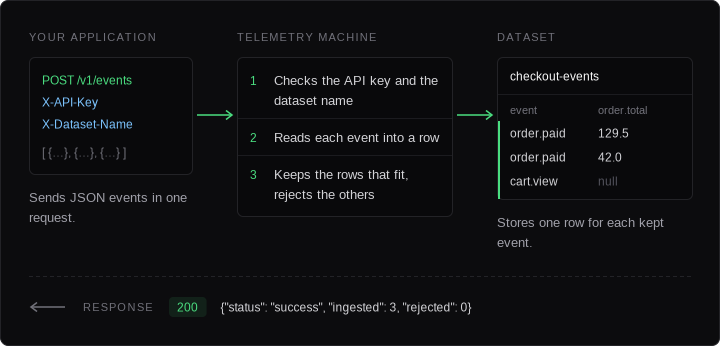
You send each event as a JSON object in an HTTP request. Telemetry Machine adds a column for each new field. You do not define a schema before you send events.
 ## Before you start
- You must have a Telemetry Machine account and an organization.
- To create a dataset or an API key, you must be an owner or an admin of the organization.
- To use the commands on this page, install `tm-cli` and sign in, or connect your coding agent to the MCP server. Refer to the [quick start](https://telemetrymachine.com/docs/quick-start).
## Create an events dataset
Create an events dataset, such as `checkout-events`, and an ingest key that can write to it, with [tm-cli](https://telemetrymachine.com/docs/quick-start#tm-cli) or the [MCP server](https://telemetrymachine.com/docs/quick-start#option-1-set-up-with-a-coding-agent):
```console tab="tm-cli"
$ tm-cli datasets create --name checkout-events --type events
$ tm-cli api-keys create --name checkout-backend --dataset checkout-events
```
```json tab="MCP"
create_dataset { "name": "checkout-events", "signal_type": "events" }
create_ingest_key { "name": "checkout-backend", "datasets": ["checkout-events"] }
```
tm-cli shows the key once, in `api_key.api_key`. Over MCP, your agent gets it once and saves it in your app's configuration. In the app, [create an events dataset](https://telemetrymachine.com/datasets/new): its last step shows a key for it. To send events with the key, refer to [Send events](https://telemetrymachine.com/docs/json-events#send-events).
### Dataset names
- Use only lowercase letters, digits, hyphens (`-`), and underscores (`_`).
- Do not use a period (`.`) in the name.
- You cannot use the name of a deleted dataset again.
## Create an API key
The application makes an API key when it creates a dataset. To make a different key, do these steps:
1. Open **Settings**, then **API keys**.
1. Select **Create key**.
1. In **Name**, type a name for the key.
1. In **Datasets it can write to**, select the events dataset.
1. Select **Create API key**.
1. Copy the key. Keep it in a safe location.
An API key can send data only. It cannot read data. One key can write to more than one dataset, but each request sends events to one dataset.
> [!NOTE] A change to a key can take 5 minutes
> A change to the datasets of a key can take a maximum of 5 minutes to have an effect.
## Send events
Send a `POST` request to this endpoint:
```text
https://api.telemetrymachine.com/v1/events
```
A sender that cannot set headers can name the dataset in the URL instead of `X-Dataset-Name`: `https://api.telemetrymachine.com/datasets//v1/events`. It can also send the API key as `Authorization: Bearer `.
### Headers
| Header | Value | Necessary |
| ------------------ | ---------------------------------------------------------------------- | ------------------------------------- |
| `X-API-Key` | The API key. | Yes |
| `X-Dataset-Name` | The name of the dataset. Uppercase and lowercase letters are the same. | Yes, unless the URL names the dataset |
| `Content-Type` | `application/json` or `application/x-ndjson`. | Yes |
| `Content-Encoding` | `gzip` or `zstd`, if you compress the body. | No |
| `Idempotency-Key` | A different value for each request, 512 characters maximum. | No |
Use `Idempotency-Key` if you send a request again after an error. Refer to [Send a request again](https://telemetrymachine.com/docs/json-events#send-a-request-again).
### Body
The body can have one of these forms:
- One JSON object, with `Content-Type: application/json`.
- A JSON array of objects, with `Content-Type: application/json`.
- One JSON object on each line (NDJSON), with `Content-Type: application/x-ndjson`.
Send only JSON objects. Telemetry Machine does not keep array items or lines that are not objects. If one NDJSON line is not valid JSON, Telemetry Machine rejects the full request.
### Example
This request sends one event:
```bash
curl https://api.telemetrymachine.com/v1/events \
-H "X-API-Key: $TM_API_KEY" \
-H "X-Dataset-Name: checkout-events" \
-H "Content-Type: application/json" \
-H "Idempotency-Key: 6c2f0e9a-3b1d-4f7e-9a58-0d4b1c7e2a91" \
-d '{
"timestamp": "2026-10-08T12:00:00Z",
"uuid": "0b8e7c52-6d1f-4a3e-b9c4-5f2a8d1e7c60",
"event": "order.paid",
"order": { "id": "A-1042", "total": 129.5, "currency": "EUR" },
"user": { "id": 77, "plan": "pro" }
}'
```
This request sends a compressed NDJSON file:
```bash
gzip -c events.ndjson | curl https://api.telemetrymachine.com/v1/events \
-H "X-API-Key: $TM_API_KEY" \
-H "X-Dataset-Name: checkout-events" \
-H "Content-Type: application/x-ndjson" \
-H "Content-Encoding: gzip" \
--data-binary @-
```
## Event fields
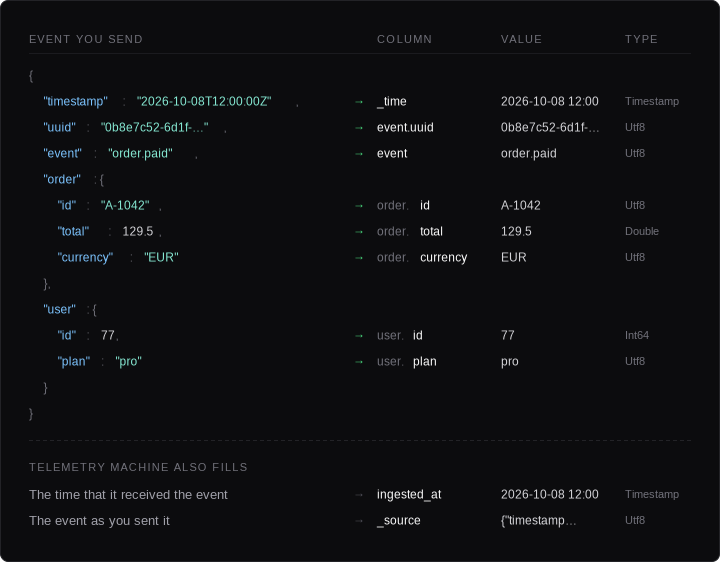
This figure shows how the example event from [Send events](https://telemetrymachine.com/docs/json-events#send-events) becomes one row:
 ### Event time
Put the time of the event in `timestamp`. Use one of these forms:
| Form | Example |
| ------------------------------------------ | ------------------------------------------- |
| A date and time with a time zone | `"2026-10-08T12:00:00Z"` |
| A Unix time in seconds | `1791460800` or `1791460800.25` |
| A Unix time in milliseconds | `1791460800000` |
| A Unix time in microseconds or nanoseconds | `1791460800000000` or `1791460800000000000` |
Telemetry Machine finds the unit from the size of the number. You can also send the number as a string, for example `"1791460800"`.
A date must have a time zone: `Z` or an offset, for example `+02:00`. Telemetry Machine rejects a date without a time zone, for example `2026-10-08T12:00:00`.
If an event does not have `timestamp`, Telemetry Machine uses the time that it received the event.
> [!NOTE] Other names for the time field
> Telemetry Machine also reads the time from `@timestamp` and `timestamp_unix_ns`. If an event has more than one of these fields, Telemetry Machine uses `timestamp_unix_ns` first, then `timestamp`, then `@timestamp`.
### Event ID
Put an ID for the event in `uuid` or `event.uuid`. Use a different ID for each event. Telemetry Machine keeps the ID in the `event.uuid` column. If the event does not have an ID, Telemetry Machine makes one.
### Field names
Each field becomes a column with the same name. For a field in a nested object, the column name is the keys with a period between them:
```text
{"order": {"id": "A-1042"}} → order.id = "A-1042"
```
A key that contains a period gives the same column. `{"order.id": "A-1042"}` also gives `order.id`. If one event has the two forms of the same name, Telemetry Machine rejects the event.
Telemetry Machine reads objects to a depth of 5 levels. It keeps a deeper object as JSON text in one column. It keeps an array as JSON text in one column.
### Field types
The values in the first request that contains a field set the type of its column:
| JSON values | Column type |
| ---------------------------------------------------- | ----------- |
| `true` or `false` | `Boolean` |
| Integers | `Int64` |
| Numbers with a decimal point, alone or with integers | `Double` |
| Strings, arrays, or objects | `Utf8` |
| Strings and numbers in the same field | `Utf8` |
The type of a column does not change after Telemetry Machine creates it. If a value does not fit the type, Telemetry Machine rejects the event. Examples:
- A `Double` column keeps integers.
- A `Utf8` column keeps all values. It keeps numbers and booleans as text.
- An `Int64` column rejects `2.5`. It also rejects strings, for example `"5"`.
Telemetry Machine does not read numbers or dates in strings. The value `"42"` is text.
> [!WARNING] Send each field with the same JSON type every time
> If a field can have a decimal value, the first request with the field must contain a value with a decimal point. If the first value is `3`, the column type is `Int64`, and Telemetry Machine then rejects `2.5`. Some JSON libraries, for example `JSON.stringify` in JavaScript, write `3.0` as `3`.
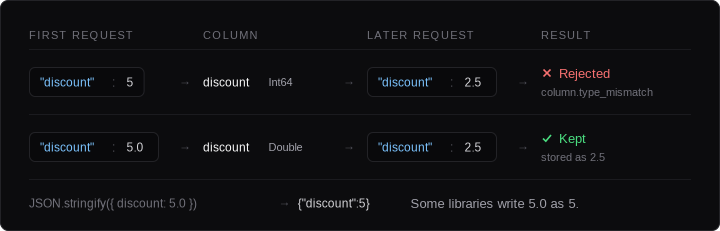 You cannot change the type of a column. If a column has an incorrect type, send the value in a field with a new name.
### Columns that Telemetry Machine fills
Each events dataset has these columns. Telemetry Machine fills them for each event:
| Column | Type | Value |
| ------------------- | -------------------- | ----------------------------------------------------------- |
| `_time` | `Timestamp(ns, UTC)` | The event time. |
| `timestamp_unix_ns` | `Int64` | The event time, in nanoseconds. |
| `event.uuid` | `Utf8` | The `uuid` or `event.uuid` of the event, or a generated ID. |
| `_ingest_id` | `Utf8` | The `_ingest_id` of the event, or a generated ID. |
| `ingested_at` | `Timestamp(ns, UTC)` | The time that Telemetry Machine received the event. |
| `_tenant_id` | `Utf8` | The ID of your organization. |
| `_source` | `Utf8` | The event as you sent it, as JSON text. |
Telemetry Machine replaces the values that you send for `_time`, `ingested_at`, `_tenant_id`, and `_source`.
## Read the response
 ### Status codes
| Status | Body | Meaning | What to do |
| ------ | ----------------------- | ------------------------------------------------------------ | --------------------------------------------------------------------------------------------------- |
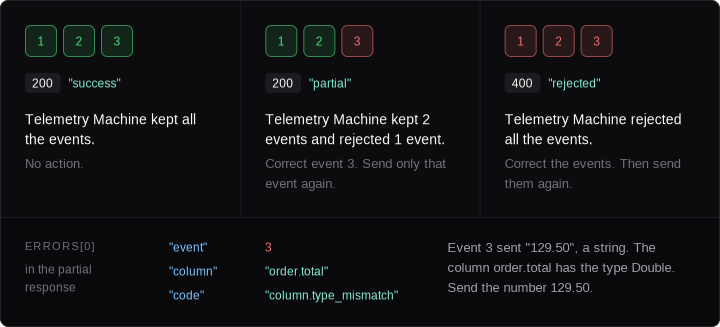
| 200 | `"status": "success"` | Telemetry Machine kept all the events. | No action. |
| 200 | `"status": "partial"` | Telemetry Machine kept some events and rejected some events. | Correct the rejected events. Send only those events again. |
| 400 | `"status": "rejected"` | Telemetry Machine rejected all the events. | Correct the events. Then send them again. |
| 400 | `"detail": ""` | The request is not correct. | Read the message. Correct the request. |
| 413 | | The request body is larger than 32 MiB. | Send smaller requests. |
| 429 | | The API key sent more requests than the rate limit. | Wait. Then send the request again. |
| 500 | `"detail": ""` | An error occurred in Telemetry Machine. | Send the request again with the same `Idempotency-Key`. |
| 503 | `"detail": ""` | Telemetry Machine cannot keep events at this time. | Wait for the seconds in `Retry-After`. Then send the request again with the same `Idempotency-Key`. |
The message `Invalid API key, or the key cannot write to the dataset , -events or _events` has one of these causes:
- The API key is not correct, or it does not exist.
- None of ``, `-events` and `_events` is the name of a dataset. Telemetry Machine tries them in that order; see [Inferring the dataset from the name](https://telemetrymachine.com/docs/send-opentelemetry#inferring-the-dataset-from-the-name).
- The API key cannot write to any of them.
### Accepted and rejected events
This response shows a request with 3 events. Telemetry Machine kept 2 events and rejected 1 event:
```json
{
"status": "partial",
"ingested": 2,
"rejected": 1,
"errors": [
{
"event": 3,
"column": "order.total",
"code": "column.type_mismatch",
"message": "the value does not fit the column's type Double"
}
]
}
```
- `ingested` is the number of events that Telemetry Machine kept.
- `rejected` is the number of events that Telemetry Machine did not keep.
- `errors` gives the cause for rejected events. It shows a maximum of 16 events for each 3.5 MiB of the request.
- `event` is the position of the event in the request. The first event is 1.
Telemetry Machine does not keep a rejected event. If you send the same event again with no change, Telemetry Machine rejects it again.
### Rejection codes
| `code` | Cause |
| ---------------------- | ---------------------------------------------------------------------------- |
| `column.type_mismatch` | A value does not fit the type of its column. |
| `column.invalid` | The time of the event is not a date with a time zone or a Unix time. |
| `column.required` | A column that must have a value has no value. |
| `column.unknown` | The field has no column, and the dataset cannot add columns. |
| `json.duplicate_key` | An object has the same key two times. |
| `json.path_collision` | Two keys give the same column name, for example `{"a.b": 1, "a": {"b": 2}}`. |
| `json.too_deep` | The event has more than 64 levels of objects and arrays. |
| `json.path_too_long` | A column name is longer than 1,024 bytes. |
## Send a request again
Send a request again if the status is 429, 500, or 503, or if you do not get a response.
1. Give each new request a different `Idempotency-Key`.
1. If you send the request again, use the same `Idempotency-Key` and the same body.
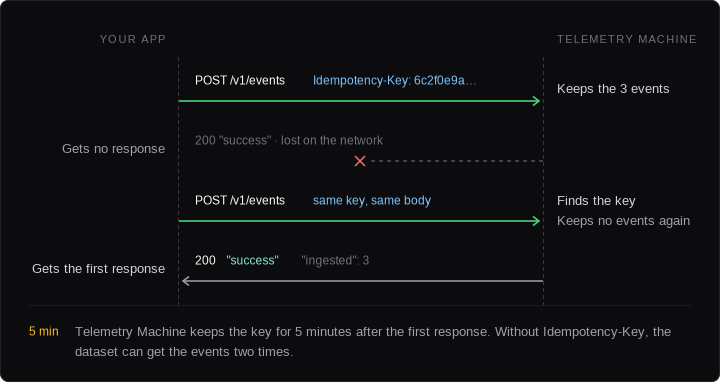 If you send the same request with the same key in less than 5 minutes, Telemetry Machine does not keep its events again. It sends the first response again.
Telemetry Machine keeps a large request in parts. If one part fails, send the full request again with the same key. Telemetry Machine does not keep the other parts two times.
If a request does not have `Idempotency-Key`, Telemetry Machine reads it as a new request. If you send it again, the dataset can have its events two times.
## Limits
| Item | Limit |
| -------------------------------------------------- | -------------------------------------------------------- |
| Request body, as sent | 32 MiB |
| One event | Less than 4 MiB |
| Events in one request | 65,536 |
| Different fields in one request | 249 |
| Events multiplied by different fields in a request | 1,048,576, for example 32,768 events with 32 fields |
| Depth of objects and arrays in one event | 64 levels |
| Event time | 1973 to 2262 |
| Column name | 1,024 bytes |
| `Idempotency-Key` | 512 characters |
| Requests for each API key | 1,000 for each second, with bursts of a maximum of 5,000 |
If a request goes above a limit, Telemetry Machine rejects the full request. The status is 413 for the body size, 429 for the request rate, and 400 for the other limits.
## Query your events
Events are usually available to queries a few seconds after a success response. Sometimes this takes a maximum of 30 seconds.
To see your events in the application, open **Query**. Then select your events dataset.
To see the columns of the dataset with `tm-cli`:
```console
$ tm-cli schema get checkout-events --type events
```
To query the events of the last hour:
```console
$ tm-cli query checkout-events --type events --since 1h --limit 20
```
## Troubleshooting
### The response is Invalid API key
Make sure that `X-Dataset-Name` is the name of the dataset, not its ID. It can also be the name without `-events`. Make sure that the API key can write to the dataset. If you changed the key, wait 5 minutes.
### Events show the time of the request, not the time of the event
The events do not have a `timestamp` field. Make sure that the field name is `timestamp`, not for example `time` or `ts`. Refer to [Event time](https://telemetrymachine.com/docs/json-events#event-time).
### Telemetry Machine rejects a number with column.type_mismatch
The values in the first request that contained the field set the type of its column. For example, if that request sent integers, the type is `Int64`, and the column rejects decimal values. To send a different type, use a field with a new name. Refer to [Field types](https://telemetrymachine.com/docs/json-events#field-types).
### A number shows as text
The first request with the field had a string, or had strings and numbers. The column type is `Utf8`. Send numbers as JSON numbers, not as strings.
### The response was a success but an event is not in the dataset
- Make sure that the event was a JSON object. Telemetry Machine does not keep array items that are not objects.
- Make sure that the query time range includes the event time. The event time comes from `timestamp`, not from the time of the request.
## FAQ
### Can I change the type of a field?
No. The values in the first request that contains a field set its type, and the type does not change. To send a different type, use a field with a new name.
### Do I have to send `timestamp`?
No. Without it, the event time is the time that Telemetry Machine received the event. Send it if the event occurred some time before the request.
### Can I send events to a traces, logs, or metrics dataset?
No. Send events only to an events dataset. Use OpenTelemetry for traces, logs, and metrics. Refer to [Quick Start](https://telemetrymachine.com/docs/quick-start).
---
All pages: https://telemetrymachine.com/docs/llms.txt